



Setting up secure network connections between client machines and the server is an essential part of the overall Internet security mechanism when working online. In particular, it makes it possible to organize a reliable user authorization system and prevent external interference with transmitted traffic — that is, hacking.
The SSH (Secure Shell) protocol is one of the few that can provide complete data protection, provided that several formal configuration rules are followed. Let’s take a closer look at the protocol’s capabilities and how to configure it correctly.
SSH Protocol Characteristics and Operation
We will focus on the free implementation of the SSH protocol — OpenSSH, which is the most widespread and therefore the most popular among hosting center administrators.
OpenSSH is implemented as a set of software components, each responsible for a specific function. Here are some of its main components:
- Ssh — establishes a remote connection;
- Sftp — provides file transfer over the network;
- Sshd — the server-side daemon that manages access to data;
- Ssh-keygen — generates a private and public key pair on request.
The protocol uses a client–server architecture in which the server receives connection requests from clients on a specific port (by default, port 22). Then the client authentication process takes place; if it succeeds, the server grants the client access to the system.
There may be several authentication methods. Below are the main ones, listed in order of increasing security:
- Password authentication;
- Authentication using a key pair;
- Two-factor authentication.
Password authentication offers the lowest level of protection due to its fundamental design. In this case, the password must always be stored on the server, which will sooner or later lead to its compromise, regardless of complexity — it’s only a matter of time.
A key pair allows for a sufficiently secure protection system, provided that all formal rules are followed — for example, never sharing your private key with anyone.
Client authentication in this case works as follows: using the ssh-keygen utility, a pair of character sequences is generated, one of which is the owner’s private password (private key), and the other (public key) must be transferred to the machines the owner plans to connect to and placed in the .ssh/authorized_keys directory.
During authentication, the server requests the client’s private key, and if it matches the public key — access is granted.
Two-factor authentication is the most secure option. Today, it is widely used — in banking systems, email account protection, and user accounts on online marketplaces, among others.
Its principle is based on using an additional security factor (token) transmitted via an independent communication channel in real time. For example, a code word in a bank SMS message is such a token, while GSM communication is an independent transmission channel.
SSH capabilities allow you to use any of these authentication methods on the server, their combination, or all of them together. Typically, the most secure options are chosen.
Means of Managing the SSH Protocol
You can manage the protocol via the terminal’s command mode or by changing the configuration file parameters, which include:
- the system file ssh_config;
- the user file named config;
- the server file sshd_config.
The priority of these management methods (in descending order) is:
- Commands with parameters in terminal mode;
- Configuration of the user config file;
- Configuration of the system and server config files.
By using configuration file parameters, you can easily enforce the required security level of the network connection or the client authentication system. Below we examine one of the protection schemes.
Security Parameters
We can conditionally highlight a group of SSH configuration parameters that directly or indirectly influence the security level of the connection or how client authentication is organized. Here are some of them:
- AuthenticationMethods – sets the active authentication methods;
- PasswordAuthentication – enables or disables password-based authentication;
- PubkeyAuthentication – enables or disables public-key authentication;
- ClientAliveInterval – defines the time when there is no activity from the client;
- MaxAuthTries – defines the maximum number of connection attempts from a client within a single session;
- PermitRootLogin – allows or prohibits remote login to the server as the root user;
- AllowUser, DenyUser – define the set of users who are allowed (AllowUser) or denied (DenyUser) login;
- Port – sets the port for client connections;
- CheckHostIP – enables or disables checking the client’s IP address against the list in the known_hosts file. These are the addresses of machines that have previously connected, i.e. trusted hosts, whose public keys are also stored there.
Practical Implementation of the Protection Scheme
On our server running Ubuntu 22.04, we’ll set the required security parameter values in the SSH configuration files.
In the terminal, using the nano editor, open the system file ssh_config and apply the following settings:
$ nano /etc/ssh/ssh_config
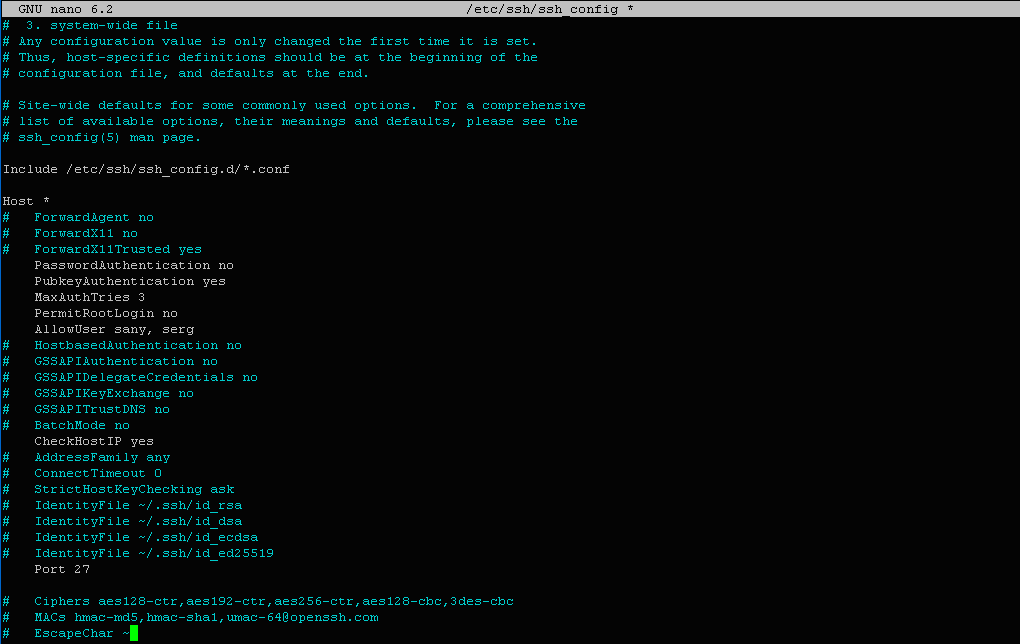
We changed the default security parameter values to:
PasswordAuthentication     no
PubkeyAuthentication       yes
MaxAuthTries               3
PermitRootLogin            no
AllowUser                  sany, serg
Port                       27
CheckHostIP                yes
As a result, we implemented a protection scheme in which:
- Password authentication is disabled;
- Public key authentication is enabled;
- A maximum of 3 authentication attempts per session is enforced (default is 6);
- Remote root login is disabled;
- The set of users who are allowed to log in is restricted;
- The default port is changed to 27;
- IP address verification is enabled against entries stored in known_hosts. This means connections are accepted only from previously verified machines.
We implemented this security scheme solely using SSH’s own management tools, without resorting to external software such as IPTABLES or similar. This, firstly, speeds up data processing, and secondly, simplifies configuration.
Of course, different protection schemes can be used depending on the specific situation, but the basic elements outlined here should be present in any case.